Frequently Asked Questions
Getting Started
The implementation starts with your project manager hosting a kickoff call to discuss goals, timelines, and next steps. After that, our team travels to your facility to meet with your staff and begin tagging assets using Near Field Communication (NFC) tags.
We tailor the setup to your facility’s unique needs, ensuring a smooth and effective deployment. Full implementation usually takes about three months, but varies greatly depending on the packages purchased. Multiple packages can be installed simultaneously to speed up the process.
Once added to the system, you’ll get a welcome email with a temporary password to log in and create your own secure password. From there, you can access SAIM, manage your facilities, and oversee your assets with confidence.
Our team is here to ensure that your experience with SAIM is smooth and productive. While we empower you to use SAIM’s tools independently, we’re here to assist when needed. We offer support for general questions, software troubleshooting, user management, maintenance scheduling, asset corrections, large file uploads, and real-time data requests. You can also submit a ticket through our Support Portal to get help from a real person—no bots involved.
Plus, we provide ongoing training and resources so you can keep learning and stay up to date with SAIM’s latest features and updates. Just ask about course enrollment when you submit a ticket. No matter your needs, our expert team is ready to assist you every step of the way.
Integration and Security
SAIM can connect with existing systems depending on your operational setup. Common integrations include utilization trackers, inventory management systems, and other tools that can connect to our REST API. Your project manager will review what’s possible during the onboarding process.
SAIM maintains strict data privacy and compliance through controlled access, advanced encryption, continuous threat monitoring, and well-governed security policies. These measures are reinforced through regular independent audits to ensure consistent protection and regulatory alignment. Learn more on our Security page.
You retain full ownership of your data at all times. If your organization discontinues its SAIM subscription, we will provide a complete export of your data for seamless transition and continued success.
Mobile Accessibility
Yes, SAIM is optimized for Google Chrome. Additionally, third-party cookies must be enabled in your browser settings. If third-party cookies are disabled, you may encounter issues, such as the inability to view the menu bar. To ensure a seamless experience, enable third-party cookies in your browser settings.
Almost! SAIM on mobile functions like the desktop website, but there are a few differences in navigation:
In the Document Management section, you can open or preview a document (depending on its file size) by simply double-clicking on it, just like on a computer.
To access the context menu for options like Share, Rename, or Delete, tap the three horizontal dots (…) next to the file or folder name.
Yes! Our app is built to work offline. Once connection is restored, the app will sync the data back to the cloud that was completed during the offline period.
Using SAIM on your mobile phone offers unmatched convenience and accessibility. You can manage tasks, update information, and access important documents anytime, anywhere, keeping you connected and in control even when you’re on the move.
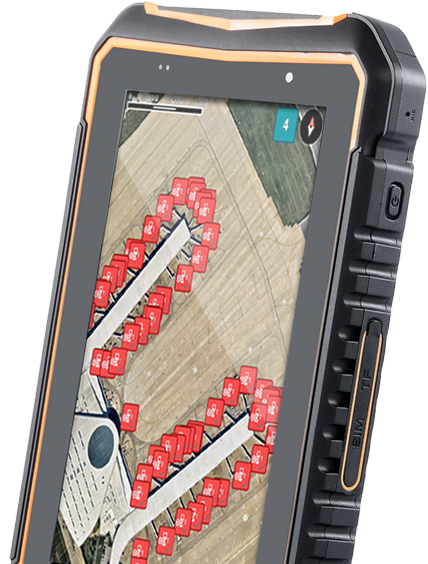
A mobile app primarily used by operators for task management. It includes features like NFC scanning, timekeeping, and paperless work order creation. The app is currently available via Google Play for Android (iOS app is currently in the works).
Pricing
SAIM is an adaptable, modular software, so while purchasing all modules is not required, having the full platform gives a digital view of your facility with the ability to dig deeper into asset health and status in real-time.
SAIM is priced by the size of the facility/asset count. We do custom pricing based on a variety of factors.
SAIM Software
SAIM stands out by offering a simple-to-implement solution tailored to your facility’s unique needs through customized installations. We provide comprehensive user training and alarm setup support to ensure your team is confident and ready to operate. With SAIM, you maintain permanent ownership of your data, accessible anytime via mobile capability. Our platform is built with certified cybersecurity protections designed by engineers for engineers, ensuring your asset integrity is safeguarded. Plus, our dedicated customer service team is always here to support you every step of the way.
SAIM is an online platform offering Smart Asset Integrity Management solutions, utilizing IoT technology to provide real-time insights into your system’s performance. It enables you to manage your fueling assets with a Digital Twin, which is a digital representation of your entire facility, including both physical and procedural assets. This feature helps remove uncertainties by offering a clear, accurate view of your operations.
The platform empowers facility design, maintenance, and management through centralized information and intelligent dashboards. These tools enable transparency, mitigate risks, ensure compliance, enhance knowledge sharing, and support informed decision-making.
Your subscription package determines which modules are part of your active portfolio. SAIM offers a modular structure, allowing you to subscribe to various features tailored to specific operational needs. Once your subscription is set, access to the platform is provided, with each module becoming available as it is developed and populated.
SAIM’s Key Offerings
1. As-Built and Digital Twin
Leverage laser scan point cloud data to create precise 3D models of your facility. This approach reduces the need for physical inspections, lowering costs and minimizing risk. As-built models enhance the design process, reduce requests for information (RFIs), mitigate construction risks, and can significantly speed up project timelines.
Modules included:
- Facility Assets
- Photos & Measurements
- Digital Twin
2. Maintenance
A comprehensive tool for planning, executing, and auditing ongoing facility maintenance and inspections. It centralizes facility maintenance data, design records, reports, documents, manuals, and key contacts into one document control system.
Modules included:
- Facility Assets
- Document Management
- Inspection and Maintenance
3. Monitoring
Provides dashboard views of your system’s live performance, complete with alerts, alarms, and push notifications. As your databases grow, SAIM captures trends in charts and graphs to support proactive business decisions.
Modules included:
- Real-Time Signals
While SAIM currently serves clients primarily in the commercial aviation industry, its adaptable software is designed to support a wide range of facilities. This includes military and government sites, Fixed-Base Operators (FBOs), utilities and public works, Architecture, Engineering and Construction (AEC) firms, industrial operations, and many others.
SAIM is built from an engineering perspective to serve everyone involved in monitoring, maintaining, and managing critical assets. This includes owners, operators, facility managers, facility administrators, general managers, airline fuel representatives, facility engineers, and engineers. No matter your role, SAIM provides the tools and insights you need to keep your assets running safely and efficiently.
Tasks
They are specific tasks designed to be completed based on certain conditions or events rather than a set schedule. Think of these as situational tasks—like tasks triggered by specific events such as rain or another unique occurrence at the facility. They are perfect for situations that don’t require regular maintenance but do need attention under certain conditions.
The SAIM Inspection and Maintenance module lets you manage both scheduled maintenance (like pump oil changes or facility walk-arounds) and “As Needed” tasks (such as inspecting equipment after heavy rainfall). For example, a manager can create templates for employees to use during specific situations. These tasks don’t happen on a fixed schedule but are essential when certain conditions arise.
This flexibility is ideal for keeping up with unforeseen circumstances, allowing managers to ensure the right maintenance is done at the right time.
As-Needed Tasks offer flexibility in task management, ensuring that condition-based tasks can be efficiently tracked and completed. Here’s why they are beneficial:
- Situational flexibility: They allow you to specify tasks for specific events (e.g., post-rain inspection tasks).
- Detailed tracking: They help maintain a clear record of non-routine work, ensuring accurate documentation.
- Labor cost tracking: With recent updates, As-Needed Tasks can include labor cost tracking based on the hourly rate for assigned users, giving more insights into resources used per task.
- Custom Questionnaires: As-Needed Tasks can include Custom Questionnaires, allowing you to tailor task-specific questions that guide the work and ensure all necessary information is captured based on the task’s situational requirements.
Using SAIM
SAIM supports ATA 103 and other standards like hydrant system inspections, tank inspections, and cleaning reports. It simplifies compliance by providing automated, enhanced ATA forms that capture detailed data, including individual asset tags. This is especially helpful for Lead Operators and auditors, providing a clear daily record of completed tasks and who performed them.
The Audit Forms Dashboard offers centralized visibility into completed and pending inspections, helping supervisors track and act on overdue tasks. While it summarizes inspection data, it doesn’t replace the official ATA forms.
ATA forms in SAIM cover fuel facility checks, hydrant system checks, aircraft fueling equipment, filter vessel pressure, and more—ensuring thorough documentation of maintenance and safety activities across your operations is readily available to demonstrate compliance. With SAIM’s ATA Forms on Demand, staying audit-ready is simple and efficient, letting you focus on maintaining safe and compliant operations.
After logging into SAIM, you’ll have access to several dashboards tailored to different aspects of your facility’s operations:
- Operation and Maintenance Dashboard: Provides a clear, real-time view of key areas like receipts, storage, and distribution. It simplifies complex data so you can easily track inventory, monitor equipment status, and stay on top of daily operations.
- Engineering Dashboard: Focuses on trends and historical data to help you monitor facility health over time and make informed maintenance decisions.
- Business Intelligence (BI) Dashboard: Offers in-depth, real-time insights into signal data and fuel inventory, allowing you to analyze and download critical operational data easily.
- Tank Dashboard: Lets you track tank performance with detailed real-time and historical data, supporting efficient tank management.
- Pump Dashboard: Centralizes pump performance monitoring with access to current data and trend analysis to support pump maintenance and operations.
Each dashboard is designed to give you actionable insights, making it easier to oversee and optimize your facility’s performance.
SAIM Agent is an automated tool that keeps you informed of important updates across your SAIM platform—without requiring you to log in. It sends scheduled reports directly to your email, allowing you to stay updated on tasks, work orders, document changes, and more. With the latest custom reporting updates, you can now receive notifications for any report you build and save, offering full flexibility based on your operational needs.
Roles and permissions define what each user can do within SAIM, ensuring everyone has access to the tools and data they need while protecting sensitive information.
Roles in SAIM determine the overall access and privileges assigned to a user. Each role is tailored to specific job functions, ensuring users only access the tools and data relevant to their responsibilities. Common roles include Owner, Lead Operator, Operator, ESS, and Facility Admin.
Permissions are the detailed actions a user can perform within a specific area or module of SAIM. Permissions define what tasks a user can carry out, such as:
- Viewing or editing data
- Creating or deleting tasks or assets
- Managing documents or folders
Permissions are tied to roles, so users automatically receive the appropriate level of access when assigned a role.
SAIM uses a matrix system to match roles with specific permissions. For example, a Facility Admin can manage users and edit facility details, while an Operator may only view and update tasks. The Owner and General Manager decide which roles to assign to each user before deployment. Roles should align with job responsibilities to ensure efficient workflows.
SAIM’s Digital Twin is designed to simplify facility management by providing a 3D model of your entire facility, integrating data from Facility Assets, Tank Farm Manager, Document Management, and Real-Time Signals. This powerful tool consolidates essential data into one accessible, visual interface, enabling you to manage equipment, monitor maintenance, and respond to real-time alerts—all in one place.
Want to Learn More
- Explore a Self-Guided Demo. Take a tour through SAIM’s platform and see how it can transform your operations.
- Hear From Current SAIM Customers. Learn how operators, owners, and GMs are using SAIM and capturing value at their facilities.
- Request a Demo. If you’re ready to see how SAIM’s module solutions can be deployed to your unique operation, fill out a simple form to request a personalized demo. We look forward to hearing from you.
Still have questions?
Unlike many software companies, we still like to talk with people. If you’re
not finding the answer you’re looking for hear, contact us. We’d love to talk.
SAIM Unlocks Your Team’s Potential.
From reducing downtime to staying audit-ready, SAIM gives you clarity, efficiency, and confidence, so your team can focus on the work that matters most.- Know it’s getting done. Track tasks, inspections, and work orders in real time.
- Avoid costly surprises. Spot asset issues early with live data, trends, and predictive insights.
- Stay ready. Keep documents, drawings, and compliance records accessible anytime.